I am using NPMplus to access my self-hosted applications via my domain name. This makes my applications publicly accessible, but I am not exposing any open ports to the Internet because NPMplus is a NGINX reverse proxy tool. That doesn’t mean I’m 100% safe from my applications being accessed, so I have take extra security precautions to help mitigate exposure. One of those precautions is enabling GeoIP country blocking with NPMplus.
What is GeoIP country blocking?
With GeoIP blocking enabled in NPMplus, I can configure which applications are accessible from what countries. Since none of my self-hosted applications need to be access from outside the United States, I block all other countries. This doesn’t protect me 100% from hackers, but it does help fight off bots and automated attacks that originate in other countries. Of course if someone wanted to attempt to access my applications from another counry, they could simply connect to a VPN in the United States.
A MaxMind.com lite plan is required in order to enable GeoIP blocking in NPMplus. It’s free, so you’ll need to register for an account to proceed. You will need to update the GeoIP section below with your own account ID and license key.
In your NPMplus’ Docker compose.yml file, you need to uncomment the GeoIP section. After that is done, rebuild your docker container by running the sudo compose up -d command. Here is what my compose.yml file looks like:
# This can be used with GOA=true to keep the geoip database updated, environment variables must be configured
  geoipupdate:
    container_name: npmplus-geoipupdate
    image: ghcr.io/maxmind/geoipupdate:latest
    restart: always
    network_mode: bridge
    environment:
      - "TZ=America/New_York" # needs to be changed
      - "GEOIPUPDATE_EDITION_IDS=GeoLite2-Country GeoLite2-City GeoLite2-ASN"
      - "GEOIPUPDATE_ACCOUNT_ID=YourAccountIDNeedsToGoHere" # needs to be changed
      - "GEOIPUPDATE_LICENSE_KEY=YourLicenseKeyNeedsToGoHere" # needs to be changed
      - "GEOIPUPDATE_FREQUENCY=24"
    volumes:
      - "/opt/npmplus/goaccess/geoip:/usr/share/GeoIP"
Check your docker and you should now have 1 additional container called npmplus-geoipupdate.
How to configure GeoIP country blocking in NPMplus
After you have enabled GeoIP within your NPMplus’ Docker compose.yml file and rebuilt the container, you need to configure your blocked/allowed countries. In my case, I am blocking every country except the United States.
Open and edit this file: /opt/npmplus/custom_nginx/http_top.conf, if you changed /opt/npmplus to a different path make sure to change the path to fit.
Here is what my http_top.conf file looks like to only allow connections from the United States:
geoip2 /data/goaccess/geoip/GeoLite2-Country.mmdb {
auto_reload 60m;
$geoip2_data_country_code default=DE country iso_code;
}

map $geoip2_data_country_code $allowed_country {
default no;
US yes;
}

geo $lan-ip {
default no;
192.168.0.0/16 yes;
172.16.0.0/12 yes;
10.0.0.0/8 yes;
}

map $http_upgrade $connection_upgrade_keepalive {
default upgrade;
'' '';
}
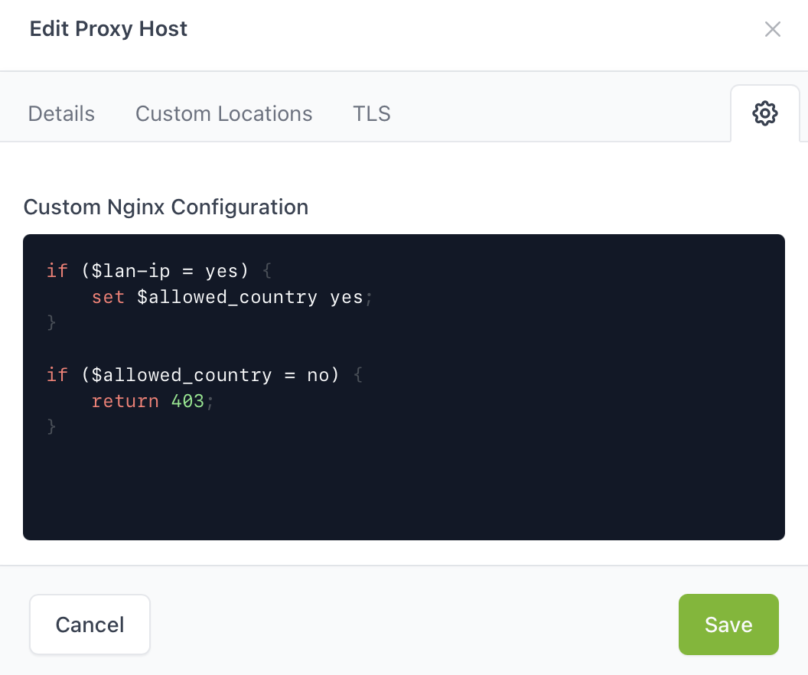
Next, you need to login to NPMplus and edit your proxy host. Click the Settings gear in the top-right corner where you can enter a custom Nginx configuration. In the box, you will need to enter the following:
if ($lan-ip = yes) {
    set $allowed_country yes;
}

if ($allowed_country = no) {
    return 403;
}
Finally, if you have configured everything correctly, you should receive a 403 forbidden page if you try to access your self-hosted application via a country that is not allowed. Connect to a VPN in another country and give it a shot.
Conclusion
GeoIP country blocking is a simple and easy way you can enable within your NPMplus Docker container to block access to your applications from foreign countries. it’s a simple security step that can help fight attacks from countries that don’t need to access your applications. It’s does not keep you 100% safe, but it can help you stay safer online when you expose your applications via an Nginx reverse proxy.